Saturday, January 24, 2015

How to recover files from formatted drive?

Sometimes when you meet the following situations, you have to format your storage media or devices for reusing it again.
  1. Operating System not found
  2. Invalid or corrupted FAT
  3. Cannot find file or program
  4. Invalid command.com
  5. Primary/Secondary Hard disk failure
  6. Non system disk
  7. Disk error
But the problem is that once you format your storage devices or media, all your data will be wiped out and can never be found back again

Step 1. Launch EaseUS Data Recovery Wizard and select the file types you want to recover. Then click "Next" button to move to the next step.

Step 2. Select the disk where you lost your data and click "Scan" button, the software will quickly scan the selected disk to find all your target files. If you lost your partition, select "Lost Disk Drives" and "Scan" to continue the recovery process.

Step 3. After scan, you can preview all the listed recoverable files one by one and select out those you want. Then, click "Recover" button to get them back once. Here you should save all the recovered files on another disk to avoid data overwriting.

If you not have software download software from here.. Download-Win Version

Thursday, May 31, 2012

Are you excited or hesitant about driverless cars?

The technology has caught on so fast that the state of Nevada has passed the first laws allowing for automated cars! 


This new technology sounds as if it is right out of a science fiction movie, and that’s because it’s not far off. Over the past several years Google engineers and scientists have been working tirelessly at Stanford Laboratories to develop a technology that will change the way we live in the upcoming decades: the Google Car. 

Google is evidently taking its campaign to make its driverless cars legal on U.S. roads from state capitals to the nation’s capital. A Google robo-Prius was spotted last Tuesday roaming the streets of Washington, D.C., only a day after Nevada became the first state to legalize autonomous vehicles on the Silver State’s roads.
U.S. News & World Report speculated that Google was in town to appeal to federal policymakers, and possibly take them for joyrides in one of the company’s self-driving Prius hybrids. The outlet also noted that Google has racked up a reported $5 million legislative lobbying tab in the first quarter of 2012 alone – more contributed to candidates’ coffers in the same time period than Apple, Facebook and Microsoft combined.
Getting lawmakers in the seat of a self-driving Prius has become Google’s M.O., according to Matthew Newton, editor of DriverlessCarHQ.com, a site dedicated to covering autonomous cars. “Google has been giving free rides to policymakers in California, Nevada and Florida,” Newton told Wired from his home base in Melbourne, Australia. “So it makes sense that they would do it in D.C.”

Now that Google has largely cleared the technical hurdles of getting self-driving cars on the road, the next step is gaining public acceptance – and winning over policymakers, Newton added. And due to its considerable lobbying war chest and cultural clout, Google apparently has no problem getting access to powerful politicians. Some, in fact, are seeking out Google rather than the other way around.

According to Politico, House Majority Leader Eric Cantor (R-Virginia) went for a spin in a Google self-driving Toyota Prius last month, as part of a GOP effort to reach out to Silicon Valley’s deep well of tech innovators and their deeper pockets. We couldn’t confirm whether other elected officials may have been taken for a ride by Google. (Our request for more information went unanswered as of press time.)

According to Driverless Car HQ, the Washington, D.C., Department of Motor Vehicles said in a tweet that Google didn’t inform the agency of its plans to operate the car in the nation’s capital. (As with most states, D.C. allows drivers to operate out-of-state vehicles.) And U.S News & World Report said that officials for the House Committee on Science, Space, and Technology had no knowledge of Google’s plans.

This car is completely driverless. It combines information from Goggle Street View with artificial intelligence software that communicates with a sensor on top of the car, which in turn speaks to the wheels and steering wheel to drive the car without any human interference. So far the car has clocked over 175,000 miles and had zero accidents. 

See Car Driving It's Self Video


Saturday, April 14, 2012

How to Make Memory Cards.

A division of Micron technology, is a leading global provider of memory products for digital media. Check out this behind the scenes look at the extensive work and care put into each Lexar product. This video was shot using Canon 5D Mark II DSLR cameras with Lexar Professional 600x CompactFlash cards.
 
 Source: Lexar MediaInc

Friday, March 23, 2012

Make Hard Drive for GMAIL in your PC

GMail Drive is exchange all our files with our friends through Gmail. It is possible to attach almost all kinds of files (except the executable files and folders) up to the size of 25MB and share with your friends by simply sending them the files.

But sometimes you may have to face problem in this kind of sharing like inability in attaching the files into your Gmail account. Eeasy solution for this kind of trouble.

You need a Gmail virtual hard drive
– which is a helpful freeware software. You will gets a virtual hard drive created for your Gmail accounts in your computer. It is possible for you to drag and drop any file or data in this drive and when you can store data here in this drive, you get an E-mail with the file neatly attached. But you need to remember that this Gmail Drive will just be a virtual hard drive and you’ll able to use it only when your internet connection.

To Create the Virtual Hard Drive for GMAIL in your Computer.

Step 1: First Download and Install the software, i.e. Gmail Drive right in your computer.
Step 2: Once you have installed the software, you’ll find one new hard drive on your PC along with the original one. Simply Right Click on it and choose the Login As option.
Step3:  Now you’ll find that a window has popped up. You’ll simply have to fill your Username and Password to have the Virtually Created hard drive opened.

How to use the Virtual Hard Drive?
It is super simple to use. You’ll simply have to add your Username and Password and click on OK. Once the hard drive gets opened, just copy/paste or drag-drop any of your data that you want to share with your friends in to the Gmail drive.
And once you are done, you can easily log out from your account. For this you’ll simply have to Right Click on the Virtually Created Drive and choose the Log Out option and you’ll be done.

And this is all, isn’t that an easy way to share your files and folders! And the coolest part is that every time when you’ll place a file in this folder, you’ll get an Email from yourself on using which you’ll be able to forward the attachment!
But remember using this simple little trick you’ll only be able to send those files which are allowed by Gmail and not those which aren’t allowed like .exe files or any other of such kind.

Download Click here

How to Lock Your Computer using Usb

safety and security is very easy to make your laptops and notebooks safe and secure, fingerprint readers, face recognition, eye scanners etc. But is there any way to make your personal computer safe?

Let you lock your computer using a Usb. This will make your computer work only when you’ll plug in the Usb and once you’ll remove it the keyboard as well as the mouse will be disabled automatically and the screen will turn dark. And finally your computer will be locked automatically. And in order to unlock it, you will have to insert the Usb again. 

Windows which include both 32 bit and 64 bit Windows.

So, here we go for the trick that will get your computer Locked with the help of Usb using Predator:-

Step 1. Download the predator software.

Step 2. Once the installation gets completed, Predator gets launched automatically but if it doesn’t happen so in your case, you always have the possibility to run it from – Start/Programs/Predators.

Step 3. After this step, you’ll have to insert your Usb. You will now receive a message asking you to define a new password for yourself. (At the same time it is notable that this won’t get your pendrive formatted and hence your pendrive data will not get lost by this.)

Step 4. Click on the Ok of the dialogue box after which another dialogue box will appear, simple Enter your new password in it.

Step 5. Make sure that the drive letter that gets displayed under “USB key drive” really matches your flash drive. Otherwise you can also select the correct letter from the dropdown list.

Step 6. This is the final step where you are simply required to click on the Create Key button and after that on the OK button.

Now, the software will automatically exit and after this you will just have to restart the program for which you’ll have to click its icon on the desktop. But remember, a few seconds will be needed in the initialization of Predator and when you’ll find the icon in the taskbar turned green, the software will have self initialized.

Tuesday, February 28, 2012

SpaceSniffer to free up space on your Windows hard disk

Here's how you can use some free software to see what files are taking up space on your Windows hard disk.
1. Download SpaceSniffer and install it to your Windows computer.
2. After the install finishes, start the SpaceSniffer application.
3. SpaceSniffer will map your hard disk, and it will alert you to large files and folders.
4. Be sure to check out the included SpaceSniffer user manual so you understand everything that the software can do.
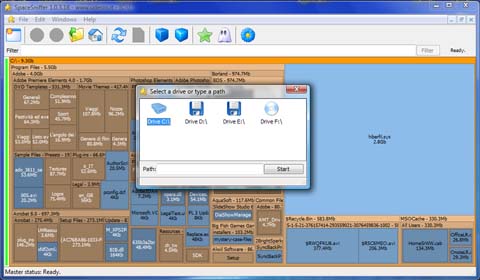
If you aren't familiar with SpaceSniffer, here's a list of features from its site:
"Fast and easy to use
Supports drag and drop
Export module lets you produce customizable textual reports
Intuitive structure layout, multiple views for different media
Zoomable elements, navigate like a web browser
The Windows folders and file popup menu is accessible by right mouse click
It's possible to restrict the view content by typing simple yet powerful filtering criteria
Lets you temporary tag files with four different colors and perform filtering on them
Different views of the same media can show differently filtered elements
Customizable in geometry, colors, behaviors
You can navigate even during the scan
Smart cached scanning engine, multiple views, single scan
You can refine a zoomed area by a secondary scan process, even with main scan active
Reacts to file system events, keeps always in synch, warns you by blinking elements
Can scan NTFS Alternate Data Streams
It doesn't clutter your registry, only a plain XML configuration file
It's portable, no installation required, just put the executable somewhere and let's go
It's freeWare (donations are welcome)"
For more, see the original article at the link below.

 This article from
http://www.howtogeek.com/62946/beginner-geek-simple-tips-to-reduce-disk-usage-in-windows-7/ 
http://www.itworld.com/software/253008/free-software-see-whats-taking-space-your-windows-disk

Monday, January 30, 2012

Charge mobile with peepal leave

Its very Strange But True Very True.

Now, you do not require any mobile charger to charge your mobiles. Only there is need to use green leaf of peepal tree and after some time your mobile will get charged.

No soon the people came to learn this development, they tested it and found encouraging results. If your mobile has been discharged and you are inside a jungle then you need not to use any charger. You Should pluck two peepal leaves and your work would be done.

It is very good idea and easy to charge your mobile. You would have to open your mobile battery and connect it with peepal leaf. After that without shaking mobile set you should set the battery in your mobile set. After some time your mobile would be charged.

Though it is unbelievable but as soon as the residents of Chitrakoot came to know about the discovery they could not believe the news. But when they saw it practically then the incident proved true.

Now hundreds of mobile holders are using this technique and charging their mobiles.

Several persons including Sushil Kumar Shukla, Santosh Verma, principal of Mahatma Gandhi School, Raj Karan Patel, Shyam Patel, Shekhar Dwivedi, Pramod Gupta, Manager of Gayatri temple, RN Tripathi proved the incident true.

Whereas according to the botanists, it is just changing mutual energy into electrical energy power can be saved in battery. Similarly, it is also possible. They said that it is the subject of research.

Step by Step guide to charge your mobile battery using peepal leaf
1- Open your mobile cover
2- Take out your battery
3- Take two to three fresh leaves of peepal/pipal/ashwattha tree
4- Touch the stub of these leaves on your mobile battery terminal for a minute
5- Clean the mobile battery terminal with the soft cloth
6- Put your battery again in your mobile and switch it on
7- Now you can see the result
8- If required repeat the process with fresh leaves

(This Article From : http://www.hoax-slayer.com/peepal-leave-phone-charge.shtml)

Sunday, December 25, 2011

New Fashion of Linux PC Raspberry Pi

New Fashion of Linux PC Raspberry Pi

What is your Favorite in related thing, Yes, Today I want to talk about favorite thing of the year: Before we had talk many things like, Flexible mobile, Ultrabook and Tablets, So, Today I am going taking about the cheap tiny linux PC - Yes, that is the Raspberry Pi!

Raspberry Pi Present $25 business card size, It will be available by the Starting this End of December of 2011, let's hope. Size: same as a credit card (for model A, even smaller, like a pen), It’s Price: should be $25. It is a full linux PC on which we can install Ubuntu, or even play Quake smoothly.

Raspberry Pi so interesting for DIY Phone Gadgets, Gorgeous user Interface, portable telecommunications services and the Internet of things everywhere with you and Raspberry Pi used to Cheap, smart, tiny linux PC that can be powerful brains of any intelligent gadget and easily uses the USB port to add Microcontrollers to control any motor or light or whatever sensors

Every project that combines Android and Raspberry Pi can make a powerful gadget. Raspberry Pi as a part of the gadget, There are two possible types of communications, it have Short range low delay communication. we can plug USB Wi-Fi or Bluetooth dongles on Raspberry Pi, it connecting to whatever microcontroller and use Android to interact with it.

Typical examples can be home automation gadgets such as an NFC lock or an intelligent air conditioner, showing user interface on the Android phone. You can connect Raspberry Pi seamlessly working with Google Maps.

We can connect the Raspberry Pi powered gadget to the Internet, and use Android to "chat" with it from everywhere in the world.

It will be more interesting for anyone looking forward to buying; the video is stored on the 2GB SD card plugged into the bottom of the board. It’s running at 1080p and uses H.264 video compression. Most importantly, it is running at full speed with audio playing even though we can’t hear it on the video due to a lack of speakers.

Good news comes in the form of better audio output from the 3.5mm jack. Until now we thought it would not only be FM quality also CD-quality Sound. I can’t wait to hear it.

Some people are wondering how in HD fits on a 2GB SD card. Well, it’s not the whole movie playing; it’s actually just the trailer on a loop. Hope that clears up any confusion Also, the board does have HDMI audio too, not just from the 3.5mm jack.

Sunday, December 18, 2011

Tablet vs. Laptop or Netbook, Which is best

Designers will appreciate the ability to use a digital pen to draw images and edit photos easily, the viewing styles are also something to consider. Tablet computers as manufacturers like Sony and Motorola join Apple in the mobile computing race. Our customers want to know what the real differences are between tablet and laptop computers. Can a tablet replace a laptop? Here are some general difference between tablets and laptops to consider before deciding which type of computer is right for you.

Upcoming Tablets new in 2012, May be you have hear about tablet anywhere, May be you thinking what is tablets? Maybe you will think tablet is one kind of medicine, if you will think medicine to tablets which one we are using in Hospital-you are wrong, tablet is new Fashion of computer system that system which one you can fill extremely exotic relief.

I will talk some future and upcoming 2012 tablets may be it helps you to choose one that is perfect and suitable to you, but you will need to be patient because all of tablets are not in around us. I mean in a market.

The Year 2012 will be the year of tablets every third company in the world will have at least one tablet PC. Tablet PC become popular in 2010. Because it is simple to use, with good battery life and users can take it wherever they go. But, we believe that 2012 tablet models will be more powerful, thinner and easier than existing models currently available on the market. we will review few models of upcoming tablets 2012.

Amazon 10 inch tablet (Kindle Fire), Asus MeMO Pad (7 inch Honeycomb tablet) and Motorola Xoom 2 (10 inch tablet). This is first model, color touch screen and will be named Kindle Fire. But it will running on Android OS and will be powered by 1.2 GHz processor. Price will be about $200 to $600. will be 3G enabled tablets, but this is quite disappointing because many manufacturers will build 4G WI-Fi into new tablets, 3G is old technology for 2012. In Tablet Asus MeMO Pad price and Motorola Xoom2 will be quite expensive, but that are only rumors. Releasing time will be in May 2012.

These three tablets will be most popular and best in 2012. Most popular will probably be the next version of iPad – iPad3, we do not know anything about these tablets because we do not have any official Information’s about this tablets. All information’s are rumors and will be better to inform to you when official performances and photos will be available. These 3 tablets, 4 with iPad3 are only tablets that are officially announced for 2012.

Difference between tablets and Laptop
 The Tablets are simple. Tablet has taken the world by storm. As a more approachable, user-friendly computer, many folks are purchasing tablets to begin learning email and basic internet functions. Tablets are a great way to keep children occupied during long free time. They can do anything from playing games to drawing to learning on interactive storybooks.
You can use table on your business but it depends on the type of work you do. If you work for a company with specific software that is not yet available on tablets, you cannot switch to a tablet just yet. if you need to save a large number of big files, tablets may not be your best option.Tablets can handle a surprising amount of information. They are also great for note-taking during meetings. Many companies have already embraced tablet technology.

One of the key differences between a tablet and a laptop is a physical keyboard and size Because of their smaller size; tablets typically do not come with physical keyboards and are instead fitted with a touch keyboard.

Most tablets have keyboards that can be purchased, but they won’t feel exactly like an attached one. If you do a lot of typing, this may be one of the hardest things to get past when considering switching to a tablet.

The lack of a Trackpad (rectangular area used instead of a mouse) on tablets. Since tablets are typically full touch screen devices,

Your Secrete Mission Spy Camera Watches

Just wear as like simple watch in your hand for right time. This watch functions like a normal wrist-watch, but it’s actually recording HD 1280 x 960 resolution video from a hidden lens. This watch is waterproof and features a tiny lens that captures video and pictures in high definition, we can view our Photo, using USB cable on a computer quickly and easily.

A spy watch looks and feels similar to an ordinary watch, with the only difference being that it is equipped with internal high definition video technology and an internal memory to go along with it

Video camera technology for a simple video recorder could be packed into a very small space and this is where spy device manufacturers recognized an excellent opportunity for business.

Spy watches are very easy to operate and the best. But since not all private investigators are wearing suits when gathering information, the spy watch is usually the most appropriate option. Spy watches can be operated from a very close range while still keeping targets completely unaware of their presence. There are many different spy camera models available for public use and these include models that resemble higher-end watches along with models that resemble sports watches.

Spy cams usually feature a fully functional watch as well. Most spy cameras have an internal memory of around 2-16 GB and will allow for up to 2 hours of HD video recording.

Login to multiple Gmail Accounts at once

Are you old Gmail user? If you are old user you know well about Gmail, before, if you login that is the final login that time you can’t login together more account. And now, Google started to support multiple sign-in. Now you can sign in to 10 accounts at the same time and use services like Gmail, Google Calendar or Google Reader.

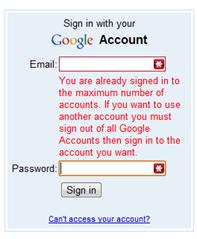
After signing in to 10 accounts, Google will show error message: "You are already signed in to the maximum number of accounts. If you want to use another account you must sign out of all Google Accounts then sign in to the account you want."

The percentage of Google users that have so many accounts must be quite small, but this feature would be really useful if it supported more Google services. Some Google users have different accounts for AdSense, AdWords, Blogger, App Engine etc.

How to Log In to Multiple Gmail Accounts at Once


Many people today keep multiple email accounts in order to separate and organize their online communications. A person may have one email address for business and one for personal activities, for example. Managing multiple email accounts can be a Burden, however: Typically a user has to sign in, read the email in that inbox, sign out, and then repeat the process for Each additional account.

However, Google recently introduced a feature to simplify the process for users of its Gmail service. With multiple sign-in enabled, users can select their different accounts from a single menu, eliminating the need to sign in and out of each one individually or to log in with different browsers. Here’s how to enable the feature.
Go to the Google multiple sign-in setup pages. If you are not already logged in to a Google account in your browser, the site will prompt you to enter credentials for one of your accounts.

Select On - Use multiple Google Accounts in the same web browser and check each checkbox to acknowledge that you understand the effects of using the feature and that not all Google products support account switching.

Click Save to retain the changes for your account.


Now that you've enabled multiple sign-in, you'll have to add each extra account to Google's list.
Go to Gmail and log in with the same account you used above, and then click your name in the top-right corner of the page to bring up account options. Select Switch account from the menu that appears.

Select Sign in to another account. This action will open a new login page.

Enter the credentials of the next Google account, and click Sign in. Just repeat these three steps for each account you would like to add.


Once you've added your accounts, switching between them in Gmail is easy. Click your name in the top-right corner of the page to bring up account options.

Select Switch account from the menu that appears.

Select the account you wish to check, and Gmail will automatically switch to that account and display your inbox.

The Next year, Ultrabook will the best Year

If 2010 was the year of the Netbook and 2011 the year of the Tablet, then 2012 is set to be the year of the Ultrabook. a device that works like a laptop, but is half the size. A young adult speaker series hosted by Intel and Lenovo, It’s fully 40 percent of all laptops sold by the end of 2012 will be Ultrabooks such as the Lenovo IdeaPad U300s.

This has become a popular platform for young, tech-savvy adults to discuss trends and issues with a range of speakers since being launched earlier this year. This time of the year is often used to reflect on a busy year and to envision what the year ahead may bring.Desktop-like performance and keen price points, we see the Ultrabook device literally being the next revolution in personal computing.'

Not only has technology become omnipresent in their lives, but it offers them the opportunity to interact with their peers, and discuss significant issues – making them genuine decision-makers and influencers in their own rights. Intel believes the Ultrabook will come into its own with the youth market by giving users what they are used to on a laptop or desktop: a keyboard, mouse and the ability to 'create' with greater ease, unlike other mobile devices.

The evolution of the laptop and tablet alike will undeniably depend on the user’s need. This will divide users into different categories – those who use their technology devices for pure consumption, and those using them for creation.The past few years have shown us clearly that people love smaller and more convenient devices.

It is expected that at least 50 different models of Ultrabook will debut at the Consumer Electronic Show (CES) in the US early next year. So many companies are getting ready to enter the Ultrabook space certainly.

'They still want to be in control, know that their identity is protected, and that their data can be safeguarded if a computer is stolen or lost. They want to connect with others and share those creations. 

Thursday, November 10, 2011

Flexible Nokia 888 mobiles will your hand


Nokia 888 Concept is mostly targeted to teenagers that are very active and take place in a lot of different activities. Nokia 888 is a concept mobile phone with a bracelet-like design that has never been endorsed by Nokia. This mobile phone concept has been designed by the industrial designer Tamer Nikiski and won the Benelux design contest in 2005. Still no mobile phone company has put it in practice.

The phone has an amazing design, Benefit from this mobile. We can fold it in many ways according to our needs. We can wear it as a bracelet, roll it, bend it and wear it as a clip on our clothes. It is amazing mobile.

It has E-motions, it means electronically motions and this is the fun side of the product. If we look from the functionality side, 888 are quite flexible. You can put it into your pocket, roll it and make it smaller, or put on your wrist when you want to make a video call on the go. If you want to talk like a normal telephone, there you have your telephone shape. We go through a lot of places and situations in the daily life, so it seems like one form is not enough.

According to insiders, the phone uses flexible touch screens for concept and liquid battery. This will be used by the users for interacting with the phone. It means if you want to inform your friends about the information at your place, you can send a related E-motion, and it will convert the phone into your subject shape.

Similarly there are several other features. Apart from these fun features, what makes Nokia 888 a unique phone is the fact that you not only can change the color of the phone, but also can change the form of the body? And in addition to this you can do the same to your friend’s phone by sending an e-motion, the inspiration behind this unique concept. 

Wednesday, November 9, 2011

Can you Imagine about new Generation Computer? Roll Top Computer , New IT Technology ROLL LAPTOP for 2012, When it's not being used, the screen rolls up into an 11-inch tube. It curls around a base tower that houses a Webcam, loudspeaker, and detachable power supply and cable that doubles as a shoulder strap. Check it out in the video below.

Maybe you think Laptop is look like as same rectangle shape it has screen and keypad and it is look like shape and sometime rounded corners.

If you ask to somebody, how it look like? They’ll tell you “it has a screen and a keypad and is sort of square shaped but maybe with rounded corners”

Again, You Ask those to elaborate on differences between the various models, you are likely to hear about differences in thickness, whether it’s light or heavy, and the None Re-sizeable screen with keypad.

Someone maybe come out and speak about fancy features like raised keyboards or multi card slots, data security. Then you have those who would focus on the different colors and trims, whether it’s glossy or matt what they are made of and so on.

Actually I’m getting at here is that basically all laptops, no matter what you call them, follow the same normal design with maybe a few added touches, features or specifications that differentiate them from the rest.

You would be pretty shocked if someone came out and said that a laptop is cylindrical or tube shaped and that it rolls up like a scroll. It might even cross your mind that they were completely mad or some alien creature from another planet.

The laptop would have a flexible OLED screen, a roll-able keyboard and the straps double up as USB outlets. It even has a mouse and a webcam that you can attach to your wrist. This really is computing on the go at its best. Hao has even put a lot of thought into the cooling system which is equally as innovative as the rest of the design.

Roll top 2.0 is a further development of Roll top with some visible and mostly invisible improvements (e.g. internal design, placement of certain components etc Roll top is a portable computer development concept for designer, architect and everyone, who would like to have a gadget, which, from an aesthetic standpoint alone, certainly hits the mark. By virtue of the OLED-Display technology and a multi-touch-screen the utility of a laptop computer with its weight of a mini-notebook and screen size of 13 inch easily transforms into the graphics tablet, which with its 17-inch flat screen can be also used as a primary monitor due to the support attached to the back of the screen.

Roll top computer that can be wrapped around a dock in a similar manner to that of a sushi roll. Imagine if you could roll up your laptop like a newspaper and open it when required.

Well all these are possible with the cool new conceptual ROLL TOP Laptop concept, which is being touted as a Future Designer Laptop. Design has unveiled this cool new concept with the support of Schlagheck-Design and the device comes with a flexible display which can be rolled and carried wherever you want. This goes beyond the traditional book like laptops which are cumbersome to say the least.

If this product is ever manufactured, you could carry your laptop like anewspaper by rolling it up, and making sure that you are not burdened by heavy laptop bags.That just isn’t an image the masses are likely to have in mind at all when you mention a laptop and yet that is exactly the design that computer scientist and designer Hao Hua has come up with.

Ok so it’s still at the conceptual stage and not a reality yet but what an exciting idea. According to Hao Hua the digital roll as he calls it is “the next generation laptop design”. Personally, I can’t wait

(Scanner Mouse) while holding the Smart Scan button on the left side of the mouse, the user simply swipes the mouse over the material to be scanned. The scanned image can then be saved in a variety of file types - PNG, JPEG, TIFF, BMP, PDF, XLS and DOC - or dragged and dropped into the desired application. Users can easily perform OCR (optical character recognition)

Maybe, you know about scanner that is scanning hard copy to soft copy, it mean only for Images base, like .jpg (JPEG), Gif (Graphics Interchange Format),.bmp (Bit Map Picture),.PNG (Portable Network Graphics), IFF (Interchange File Format), WIA (Windows Image Acquisition), TIFF (Tagged-Image File Format) etc. if you write or draw picture in any blank area or paper and you will scan through your scanner, that is only accepting image format soft , It mean hard copy to soft copy but you can’t modify as you want for it. If you want to correct some word in scanned soft paper in Ms-Word, you can’t correct word in Microsoft word.


                Now you can do your work easily without wasting time to typing and drawing again in your system (computer), Just write and draw in your desire any blank paper or any ware after you can scan through scanner mouse, it will make easy to you, that mean all your file you will could modify.


Scanner mouse is the world's first mouse with an embedded scanner function that offers convenience, mobility, and simplicity to the users. An innovative scanner that breaks through the limitations of complicated, non-portable conventional scanners is expected to be the next hit in the technology market.


Just press Smart Scan button on left side your mouse and just swipe your mouse over the material which you want to scan, after swipe just click, drag and drop in which format you want to use it. It will make easy your life. The mouse with a built-in scanner, the innovative mouse incorporates technology specifically developed for the new device, offering an array of unique functions that blend surprising innovation and user convenience.


According to the company, operating the LSM-100's scanning function is far more convenient than on conventional scanners. The scanned image can then be saved in a variety of file types - PNG, JPEG, TIFF, BMP, PDF, XLS and DOC, Just dragged and dropped into the desired application.


Users can easily perform OCR (optical character recognition) editing of scanned files as well as send them as e-mails, mobile phones etc. for corporate offices to regular usage and the LG Mouse Scanner boasts to transform scanning into a much easier and convenient task.


"LG is all set to offer a treat to the technology lovers and gizmo freaks yet again with the launch of the world's first 'Just Drag and Share' Mouse Scanner. Another technical gem with its tech -savvy, smooth design and state-of-the art technology features, it is bound to attract everyone's attention at the very first look & usage, giving it the Gen Y quotient," said Sanjoy Bhattacharya, Product Group Marketing Head, LG Electronics India Pvt Ltd.


From: - http://economictimes.indiatimes.com/search.cms?query=LG%20Mouse%20Scanner

Saturday, May 14, 2011

To change the look of Window elements

  • Open Display in Control Panel.
  • On the Appearance tab, click Advanced.
  • In the Item list, click the element you want to change, such as Window, Menu, or Scrollbar, and then adjust the appropriate settings, such as color, font, or font size.
  • Click OK or Apply to save your changes.

Saturday, May 7, 2011

Dialog box keyboard shortcuts


Press
To
CTRL+TAB
Move forward through tabs.
CTRL+SHIFT+TAB
Move backward through tabs.
TAB
Move forward through options.
SHIFT+TAB
Move backward through options.
ALT+Underlined letter
Carry out the corresponding command or select the corresponding option.
ENTER
Carry out the command for the active option or button.
SPACEBAR
Select or clear the check box if the active option is a check box.
Arrow keys
Select a button if the active option is a group of option buttons.
F1
Display Help.
F4
Display the items in the active list.
BACKSPACE
Open a folder one level up if a folder is selected in the Save As or Open dialog box.


General keyboard shortcuts


Press
To
CTRL+C
Copy.
CTRL+X
Cut.
CTRL+V
Paste.
CTRL+Z
Undo.
DELETE
Delete.
SHIFT+DELETE
Delete selected item permanently without placing the item in the Recycle Bin.
CTRL while dragging an item
Copy selected item.
CTRL+SHIFT while dragging an item
Create shortcut to selected item.
F2
Rename selected item.
CTRL+RIGHT ARROW
Move the insertion point to the beginning of the next word.
CTRL+LEFT ARROW
Move the insertion point to the beginning of the previous word.
CTRL+DOWN ARROW
Move the insertion point to the beginning of the next paragraph.
CTRL+UP ARROW
Move the insertion point to the beginning of the previous paragraph.
CTRL+SHIFT with any of the arrow keys
Highlight a block of text.
SHIFT with any of the arrow keys
Select more than one item in a window or on the desktop, or select text within a document.
CTRL+A
Select all.
F3
Search for a file or folder.
ALT+ENTER
View properties for the selected item.
ALT+F4
Close the active item, or quit the active program.
ALT+Enter
Displays the properties of the selected object.
ALT+SPACEBAR
Opens the shortcut menu for the active window.
CTRL+F4
Close the active document in programs that allow you to have multiple documents open simultaneously.
ALT+TAB
Switch between open items.
ALT+ESC
Cycle through items in the order they were opened.
F6
Cycle through screen elements in a window or on the desktop.
F4
Display the Address bar list in My Computer or Windows Explorer.
SHIFT+F10
Display the shortcut menu for the selected item.
ALT+SPACEBAR
Display the System menu for the active window.
CTRL+ESC
Display the Start menu.
ALT+Underlined letter in a menu name
Display the corresponding menu.
Underlined letter in a command name on an open menu
Carry out the corresponding command.
F10
Activate the menu bar in the active program.
RIGHT ARROW
Open the next menu to the right, or open a submenu.
LEFT ARROW
Open the next menu to the left, or close a submenu.
F5
Refresh the active window.
BACKSPACE
View the folder one level up in My Computer or Windows Explorer.
ESC
Cancel the current task.
SHIFT when you insert a CD into the CD-ROM drive
Prevent the CD from automatically playing.


To create a new Briefcase

  1. To open My Computer, double-click the My Computer icon on the desktop.
  2. Click the folder in which you want to create the new Briefcase.
  3. On the File menu, point to New, and then click Briefcase.
Note
  • To create a new Briefcase on your desktop, right-click anywhere on the desktop, click New, and then click Briefcase.

Online Free Chat

LinkGrand.com